Showing posts with label Freebies. Show all posts

Monday, December 7, 2015

Snowmen in Kindergarten

As I sort of thought, the weather is......pretty much back to the normal low of 40's and high of mid 60's. Did you think I would say it was snowing? If you did, I bet you've never been here. :)

But it doesn't prevent us from continuing on with the snow theme in the music room. This Kindergarten favorite is one that I actually learned from my son about 6 years ago! Talk about the true oral tradition living on.....he learned it in his preschool class for their winter performance and came home excited to tell it to me. I hadn't actually heard it before and it was just too cute! (Anything from a 4 year-old is though!! Well, almost anything.)


I made this as a picture book (before I got my projector), we act it out, I have made masks (which I sell in my Etsy store), we do it as just the fingerplay.....whatever feels right. I did add one thing that makes it a great vocal practice for Kinder especially.....after each snowman melts, we say "OOOOoooooooo" in a high-low sliding voice and we "melt" down to the ground (or use our hands if we are seated) to reinforce high to low. That gives us a moment to pause and think about how many are left and they are usually very eager to tell you how many the answer. (I always play innocent, though there are some days I truly can't remember which one we left off on......) 

The Powerpoint is animated to melt each snowman if you're not too click-happy and I've checked it a million times.....hopefully everything saved properly.


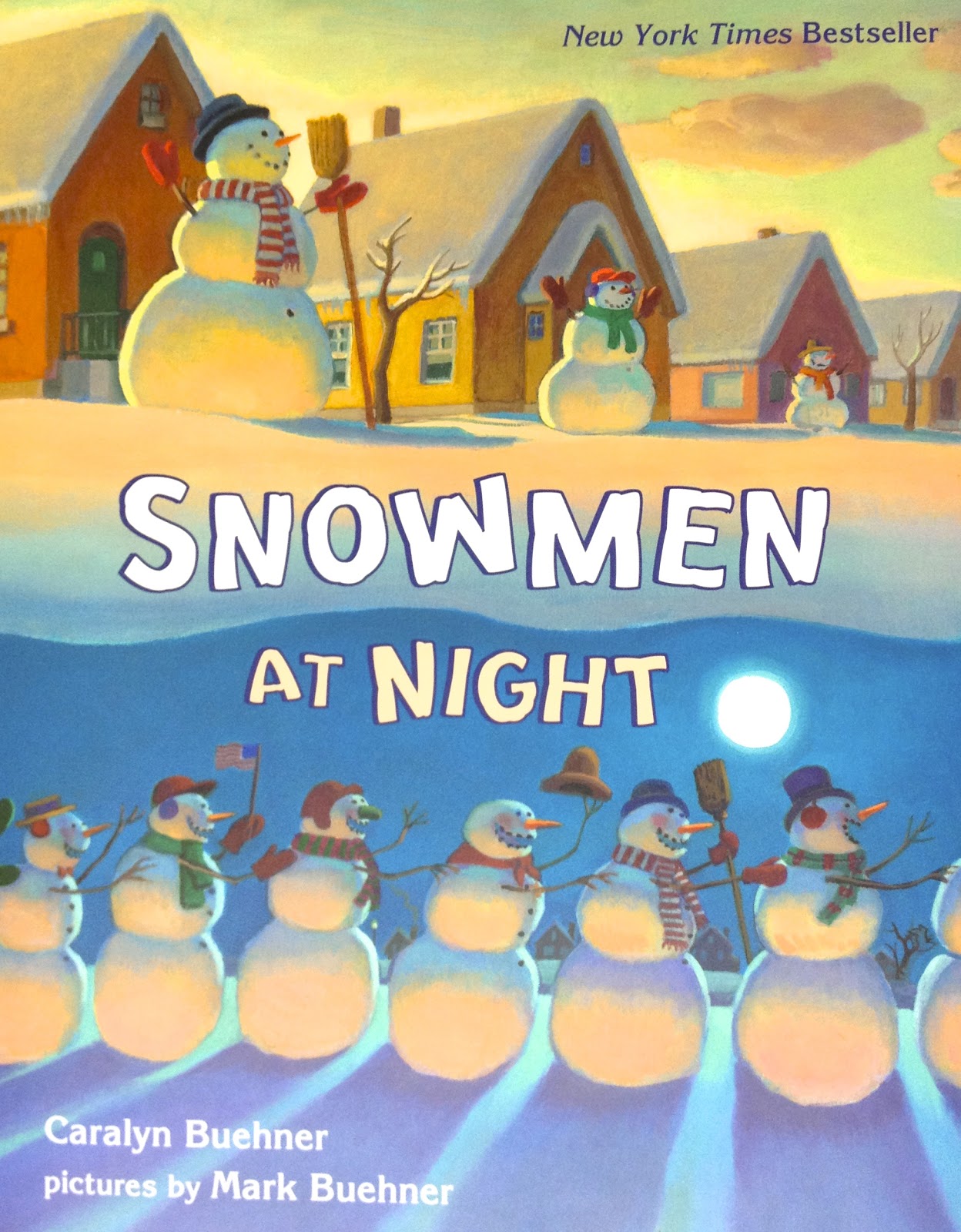
I was hoping to add in one more thing that I shared around this time last year, but the website is changing up. I found the book Snowmen at Night on a great online website called "We Give Books" but it does not seem to the there anymore. So instead, here's a link to it on Amazon and what the cover looks like:


This book is great for movement! These crazy snowmen go on an adventure all over town, sliding and gliding around.....perfect for the kids imitate. It's a delightful story. And I can't leave this post without mentioning Frosty! I love this book version:


What are your favorite snowman activities in the music room? What can you think of for the older grade levels?


Saturday, December 5, 2015

Unsplash!

Have you heard of Unsplash? If you haven't.....you're welcome! :) Seriously though, it's a great collection of beautiful, high-resolution photographs. As the front page says, they are FREE to do whatever you want. You really don't find those words on a website very often, if ever!

I love this website so much because kids need real-life experiences and real-life references as much as possible. For example, have you noticed how many train songs we sing? I realized a few years ago that the only train that a lot of my kindergarteners knew about was Thomas the Tank engine or the Little Engine that Could! Cartoon trains that talk! I always had to pull up a video of a real train well before before playing The Little Train of the Caipira as a listening example. Otherwise, they had no idea what they were supposed to be hearing. Some of the toys and cartoons out there do a good job with using the real sound effects, but there's nothing like seeing a real train and hearing the sounds it makes all at the same time.

I like to use real photographs whenever possible for this very reason. While browsing Unsplash today, I finally completed a project I've wanted to do for awhile! This picture inspired me:


I know it won't make sense, but the project is for Rocky Mountain....

Click here for a link to a set of Google slides with the lyrics and some staff work for the refrain. Feel free to copy the link to your Google Drive and leave me some comments about it!

The whole song is great for preparing/practicing the pentatone and half note. So we work on the beat, the rhythm, the solfa, anything and everything.....seriously, this song is always a hit.

By the time we are really getting into this song, the students are also talking about landforms in their classrooms. They get so excited that they can tell me what a mountain, valley and ocean is in formal terms! A retired friend of mine (and brilliant teacher!), Caroline, taught me some really fun movements and an additional verse:

Tiny island, tiny island, tiny island small
When you're on that tiny island, there's no shopping mall.

Does that picture make sense now? I usually confess that I'm pretty sure the island verse doesn't belong to the original folk song.....and that we should write some more. With older kids, you could even have them type their verse into their own Google Slide and collaborate together. And with a search function on Unsplash, you might even help them find a picture to add in to the verse. (I wouldn't necessarily suggest letting the kids go through the website themselves; I don't think there is anything wildly inappropriate but there are some swimsuit pictures, etc. that might not be the most appropriate for grade school.) They have always come up with some really creative verses! They really get into it.

By the way, let me know what you find on Unsplash!

Friday, December 4, 2015

Anchor Chart #2

Another day, another free anchor chart! This is a simple one outlining dynamics:


Again, for personal use only, please! :) Click here if you'd like to download a large version already formatted to 11"x17" to print at your local office supply store.

Wednesday, December 2, 2015

Anchor Chart Freebie

With larger-scale printing getting cheaper and cheaper, nice anchor charts are all the rage on Pinterest it seems! Sure, you could do the old-fashioned, authentic "write and draw your own on a flipchart" but for those of us who despise our own handwriting, this is a daunting task. I don't mind jotting notes on the classroom board, but if it's going to go on my wall long-term and it's in my handwriting, it's going to be typed up and printed out nicely!

I spent a lot time of gathering, admiring and borrowing ideas from here and there and finally put a few together in my own personal styles. My first priority was a chart comparing beat and rhythm. For some reason, this has always been tricky. These words seem to be blend together in a lot of kids' brains after a while. Unless the student has a solid memory for the definitions, they seem to always be looking around for the answer or how exactly to explain it.

So my version is below.

If you'd like to download it and print it out yourself, click here. (For personal use only, please!) This one is formatted for 11x17 printing at Staples for under $2 if I remember correctly.

Enjoy!

Tuesday, January 6, 2015

String Family Tech Hunt

My students are headed to the symphony after Spring Break so we are focusing in on the four families of the orchestra. We have covered facts and characteristics here and there over the years, but I definitely want to do a little more in-depth study before we get on that bus!

I'm very excited to integrate more technology into this year's orchestra study. To just tiptoe into the string family, I used a recording of a string piece with something familiar (the voice), yet a bit deceiving (the voice). I know....that sounds a bit strange, but if you know the piece, you'll know what I mean. I chose Bobby McFerrin and Yo-Yo Ma's recording of J.S. Bach's Musette.

I love this recording because the cello is just beautiful and it's just a fun, playful short piece. The vocals can be a bit distracting (whose voice is that anyway?! they all ask), but I do ask the kids ahead of time to be sure to listen carefully to all the sounds because there will be quiz about what they heard.

This takes us into a Plickers quiz. If you've never used Plickers, download those little code cards and print them now (or splurge on a set from Amazon.com like I did!). It is such a great app! All you need is one device and you can give quizzes with immediate feedback and recorded answers! (Here's the actual quiz that I gave, if you're interested in seeing or using it.)

Once that Plickers quiz was done (which I assured them was just a "see what we know" type deal; not a major test grade! though I do look forward to comparing their knowledge after we study our instruments a lot more in-depth), we split up into groups to start our tech hunt. Each group received a clipboard with their scavenger list of questions and a device. I had several QR codes taped up around the room, plus three permanent stations set up. The QRs were repeated just in case the groups were crowding around a certain one. The list is as follows:

  • QR leading to information about pizzicato technique (text only)
  • QR leading to a Thinglink about string quartets
  • QR leading to a string instrument labeled with Skitch (major parts labeled)
  • QR leading to information about how many strings in a harp (text only)
  • QR leading to information about bows and the type of hair used to make them
  • my personal Macbook in guest mode (yes, I'm brave!) with Artopia.com set up to listen and compare the four main instruments of the string family; they can do the matching game as well (if time)
  • iPad mini with MSOLearn app to view interactive orchestra seating chart information
  • teacher computer set up with a headphone splitter set to this YouTube video so one group at a time can view a short video about the string family which also introduces the harp

Edited to include Google Doc with QR codes <here>. I added labels to show which QR was which, but I don't have labels for the kids....that way it is a surprise when they open the QR, of course!

I wish I had some pictures of the kids working on their hunt....but every device I have was being used! These days I don't have a separate camera that I keep handy in my classroom.

In case you're wondering, I don't have a class set of iPads! (I wish!) I borrowed a couple from the 4th grade teachers (since they are planning, they aren't using them for teaching), used my class iPad and used a couple of my own personal devices. Unfortunately, that meant that the groups had to be slightly larger than I would have liked (4-5) but it worked out fine. The kids worked well together overall. The tech hunt will continue for 1-1.5 more lessons or so until they get the questions answered.

After this, we'll certainly explore some more string repertoire....what are your favorite recordings? Any great suggestions? Leave me a comment!! Also, any other suggestions or ideas to incorporate some more technology in my tech hunt? I'd love some feedback!

Tuesday, December 9, 2014

Freebies: Vocal warmups

I recently upgraded to the Royale membership for PicMonkey. I normally don't bother with upgrading on sites like that (I'm fairly adept with Photoshop in the first place) but the website is just too easy and the graphics are so cute and just my style. Plus, I can access it at school to make all kinds of graphics and backgrounds for my PPTs and such. The 30-day free trial didn't hurt either!

So I thought I'd pass along something that I made after playing around with this website. My kindergarteners love vocal rollercoasters. They love to play teacher by using my pointers and leading the class to follow wiggly lines on the board that move in high, medium and low curves and loops. It's great practice to get their voices moving. Since it's winter (well, the closest thing to winter we've got here in Texas), I came up with Frosty's Silly Snowballs. Here's some screenshots from the file:


(Speaking of Frosty, I am now using online books on this great website called We Give BooksFrosty the Snowman is available, as well as a cute story called Snowmen At Night. This one is particularly good for movement! I am trying to find the Twitter friend that posted this useful info so I can give her credit, but I can't find her name or the post I favorited at this moment. I'll update it if I can locate it!)

If you'd like some vocal rollercoasters that will work all year long, here's a bird flying in various paths to his tree:


I hope your students enjoy these as much as mine have! 


Tuesday, April 15, 2014

Melodic Stations

I tried out some more stations this morning and I think we're off to a pretty good start! I guess my 2nd graders are my guinea pigs this year for stations since they are (again) the grade level for this lesson.

Since we recently learned re and completed the pentatone of do-re-mi-so-la, I thought some melodic stations were in order. These were much more challenging to plan though, since melody is a lot more difficult to work on independently (if accuracy of pitch and contour is your goal!). I also wanted a variety of activities, of course, that highlighted reading, writing, listening and singing. Here's what I came up with:

Station #1: Step, Skip or Leap?
This was an interactive PowerPoint game that I made for the projector. The group had to work together to determine whether the notes were a step, skip or leap apart. The game told them whether their answers were correct or incorrect and they could try again if they were wrong. Edited to remove PPT....it had tons of mistakes that my 20th group found....hmmmm, makes me think the others weren't quite paying attention?!? Ugh. I will replace it soon once the mistakes are all found.


Station #2: What Does the Fox Box Say?

Okay, okay. Cheesy pun. (Hey, the kids loved it and my station sign!) This is my low-tech station. I recently ordered some Talk Blocks (or music boxes, as I call them) from School Specialty. I took a chance on them and while the sound quality is not great, they get the job done. My son helped me prep this station and we had fun doing it! What I really like about them is that you can insert directions or pictures into the top of them and then record 30 seconds of sound. (There are cheaper ones that have no picture inserts and about 10 seconds of recording time.) I have ten of them so I split them up into two different groups. Five of them were error detection. For example, one was a staff saying "m  r d" but I recorded me singing "d r m" and asked them to explain the difference. The other five were a mixed-up mystery song. I sang "Dinah" into the first one. The other four were me playing the four motives of "Dinah" separately on an instrument. The kids had to put them in order and sing along.

Station #3: Cookie Dough-Re-Mi
Since my new magnetic staves are actually cookie sheets, I came up with the idea of making some notes that look like cookies. I made mine out of little wooden craft circles and printed sticker paper, but you could easily do this by just printing on paper and cutting them out. I stuck magnet tape on the back, made some do clefs, made some solfa sentence strips and they were good to go. (This was something we had already been practicing in class, so writing on the staff was already familiar.)


Station #4: iCan Play Do-Re-Mi
This was the most coveted spot in the room! My coworker has a set of iPads for her classroom and was kind enough to let me borrow a few of them! We used the app Tap and Sing (Storybots) to play some do-re-mi melodies. I just printed out some melody cards and put them on the table, gave them a picture of which robots to tap, and let them practice. This was a bit more practical than using xylophones (which was my back-up plan if the iPads didn't work out) simply because we could plug in headphones and they wouldn't interrupt each other. Plus, the kids are quite motivated by using the technology!


Station #5: The Match Game
In this station, they simply got to work in teams or against each other. They had to turn over one card labeled stem and one labeled staff. If they had the same melody, they kept the match.


As you can tell, again, photography is not my strong suit. I will never understand how all these teacher blogs have such nice pictures! I look like a chicken with my head cut off trying to help kids, keep an eye on equipment (especially borrowed iPads!), making sure Talk Blocks aren't being recorded over, games are played correctly so learning is happening.....pictures obviously are the last thing to happen! :) But these stations went smoothly and we'll continue them for this week and into some of next week due to a (much-needed) holiday this Friday and a state-testing day next week.

What do you do for melodic centers? Leave me a note in the comments!

Wednesday, March 26, 2014

Freebies!

During the last #musedchat on Twitter, we were discussing the hardships of being able to provide instruments to students from low-income families. Another music teacher mentioned that they had an Orff ensemble but even struggled to provide enough instruments without having to take turns so sometimes she drew xylophone bars on a piece of paper for her kids to practice on. It reminded me of a visual I made several years ago! I shared it with her and I thought I'd try sharing it here too.

Xylophone Icon Folder

Hopefully that works! I'm still a bit new to sharing with Dropbox!

Personally, I have a printed set laminated and cut out with magnets on the back to put on my board for Orff lessons. It helps me demonstrate which bars might need to come off, or where to play. It's just a great visual for the entire class to see when my projector is showing something else. (I actually made these long before I even had a projector or Elmo!)

Xylophone set-up with B's and E's taken off
Speaking of #musedchat, if you're a music teacher on Twitter and you have a bit of time on Monday evenings, come by and chat! It's 8:00 EST and I've learned so much by chatting with the great educators there.

Enjoy!